


NYC Ferry
4.8681.00 Reviews
App Specs
- Version
- 5.7.3
- Updated On
- License
- Free
- Downloads
- 500,000+
- Developer
- Anchor Operating System
- Categories
- Travel & Local
- Platform
- Android
Screenshots

 Analysis by AppCompare
When I use public transport in New York, the hardest part is often not choosing a route; it is getting through the small moments around the trip without slowing down. The NYC Ferry App is built for that specific problem. It brings mobile ticketing and Scan & Go boarding into one place, so the ferry journey can feel less dependent on finding a physical sales point at the last minute.
I reviewed it as a free Travel & Local app from Anchor Operating System, and my overall impression is practical rather than flashy. It is not trying to replace every transport tool on your phone. Its usefulness comes from being focused on ferry travel: preparing a ticket, keeping the boarding step close at hand, and reducing the amount of paper or station-side handling involved in a normal trip.
That focus is also the reason I would not recommend installing it automatically to every visitor. If you rarely use NYC Ferry, a general navigation app may be enough for planning. If you ride regularly, however, having a dedicated ticketing tool can make the difference between a calm boarding process and a rushed search for the right place to pay.
How the app fits into a ferry trip
I find this app easiest to judge as one step in a larger trip: it can help with ferry ticketing and boarding, while a map remains better for getting to the landing and planning connections. I would decide who is handling the phone before traveling with others, then keep it accessible as I approach the terminal. That practical routine also makes it easier to see where a dedicated ferry tool differs from a general travel app.
A focused tool rather than a complete New York travel planner
The app’s central role is easy to understand: it supports mobile ferry ticketing and Scan & Go boarding. I see it as a companion for the part of the journey that happens immediately before boarding and at the entrance, not as a universal guide to everything happening in New York.
That distinction matters. A broad map app is usually better for comparing walking directions, subway connections, bus alternatives, and arrival times across the whole city. The ferry app is more useful when the ferry itself is already the transport choice and I want a more direct way to handle the ticketing step.
In everyday use, I would open it before leaving, prepare the ticketing part of the trip, and keep the phone ready as I approach the terminal. The practical advantage is not that it makes the boat faster. It makes the transaction and boarding routine more organized, especially when I am carrying bags, traveling with someone else, or trying not to hold up people behind me.
Worth Reading Before You Choose

EA SPORTS FC Mobile 26 Is a Bigger Football Game, but It Takes Time

Flipboard Shows What News Apps Must Do Beyond the Feed

Switching to Android Auto Means Rethinking Your Driving Routine

Google Calendar Makes a Crowded Week Easier to Manage

Ludo King Makes the Most of the Minutes Between Plans

Baby Panda World Brings Quick Play to Modern Phones, but Its Game Library Feels Busy
What “free” means here
The application is free to download and is suitable for Everyone. That makes the decision to try it fairly low-risk: I do not have to pay for access to the app itself before finding out whether its workflow suits my ferry habits.
It is important to separate that from the cost of riding. Free access to the app does not mean that every ferry journey is free, and I would not treat the app’s price as a statement about transport fares. The value I am judging here is the convenience of having mobile ticketing and Scan & Go boarding available without paying for the software.
For a traveler who only needs one ride, this distinction is useful. Installing a free app can still be worthwhile if it avoids a stressful purchase step, but it is not automatically better than another payment method simply because the download costs nothing. The right choice depends on whether the app’s process is more convenient for that particular trip.
What I noticed about the boarding workflow
The most useful habit is to prepare before reaching the terminal rather than waiting until the ferry is already loading. A phone that is locked, buried in a bag, or low on battery can turn a simple Scan & Go process into a needless delay. I would treat the app as part of my pre-departure checklist, alongside checking the route and leaving enough time to reach the landing.
For group travel, I would also decide in advance who is managing the tickets. Passing one phone between several people can be awkward while a line is moving. Keeping the purchasing and boarding responsibility with one organized traveler may be smoother, provided everyone knows the plan and the phone remains accessible.
This is one of the less obvious trade-offs of mobile ticketing: it removes one kind of friction but makes the phone part of the boarding routine. That is usually a good exchange, but only when the device is charged, connected as needed, and easy to reach.
Current software and device compatibility
The current version is 5.7.3, and the app runs on Android 8.0 or later. That is helpful for people using a reasonably recent Android phone, but anyone with an older device should check compatibility before relying on it for a planned trip.
I would also avoid treating an app update as something to do moments before boarding. Updating at home, while connected to reliable Wi-Fi, is a better workflow than discovering a compatibility or installation problem at the terminal. The same advice applies to travelers who are using an older phone or have limited storage.
Where it is stronger than the usual alternatives
A general map application can tell me how to reach a ferry landing, but it is not necessarily the most natural place to handle ferry boarding. A browser search may explain where to go, yet it can leave the ticketing step scattered across pages, tabs, or physical payment points. The dedicated app brings the ferry-specific action closer to the journey itself.
That does not make it a replacement for maps. I would still use a navigation tool to work out the complete trip, especially if I am connecting from a subway station or bus route. The strongest combination is often a map for the citywide route and NYC Ferry App for the ferry ticket and boarding stage.
Compared with buying in person, mobile access can be more comfortable when the terminal is busy or when I already know which service I intend to take. The trade-off is that in-person payment may feel simpler for someone who does not want another app, does not have a suitable phone, or prefers to keep travel transactions offline.
Situations where the app earns its place
Imagine I am meeting a friend near the waterfront after work. I have a bag, the streets are crowded, and I do not want to stop and work out ticketing while the ferry is preparing to board. I can use the app before leaving, keep my phone ready, and approach the boarding point with one less task to solve. That is a small improvement, but it is exactly the kind of small improvement that makes a city trip feel easier.
It can also help visitors who are unfamiliar with the ferry routine. A dedicated app gives them one obvious place to begin instead of forcing them to guess whether a map, a browser page, or a terminal machine is the preferred starting point. I would still confirm the route and landing separately, but the ticketing side becomes less intimidating.
Regular riders may find the most lasting value because the benefit repeats. Someone who uses the ferry occasionally may only notice the convenience on travel days, while a frequent passenger can build the app into a familiar routine. In both cases, the app is most valuable when the ferry is already a deliberate part of the itinerary.
Who may be better served by another option
I would skip it if I am only exploring New York’s transport options and have no realistic plan to use the ferry. A general navigation app will probably do more for that early planning stage, and installing a specialized ticketing app before I know whether I need it adds unnecessary clutter.
I would also hesitate if my phone is unreliable, shared with another traveler, or difficult to keep charged. Mobile boarding is convenient only when the device can be presented quickly. In that situation, a conventional purchase method may be less elegant but more dependable.
Someone who wants one app to manage subway directions, walking navigation, sightseeing research, and ferry tickets may find this tool too narrow. Its narrowness is a strength for the right task, but it is a weakness if I expect a complete travel assistant.
Small habits that make it more useful
Prepare the ticketing step before arriving at the landing, rather than beginning while boarding is underway.
Keep the phone accessible and charged, especially when traveling with luggage or a group.
Use a separate navigation tool for the walk, subway, or bus connection to the ferry.
Decide who will manage group tickets before reaching the boarding area.
Install or update the app before the travel day instead of relying on a last-second download.
These are not dramatic features, but they are the details that determine whether a ticketing app feels helpful in real life. The app’s core functions are simple; the quality of the experience depends heavily on preparation and on matching the tool to the trip.
Reputation and practical confidence
The app has an average rating of 4.8 from around 9.5 thousand ratings, with more than 600 written reviews and over 500 thousand installs. Those figures suggest that it has found a substantial audience among people who want a dedicated ferry companion, although popularity alone cannot guarantee that every traveler will prefer its workflow.
I read those numbers as reassurance that the basic idea is useful to many riders, not as a reason to ignore the limitations. A high rating does not remove the need to check device compatibility, keep the phone ready, or use another tool for broader route planning.
The developer, Anchor Operating System, has kept the product centered on the NYC Ferry use case rather than turning it into a general-purpose travel application. For me, that makes the app easier to understand: I know why I am installing it, what part of the journey it should improve, and when it is unnecessary.
My value judgment
Because the app itself is free, the main question is not whether it is worth buying. There is no purchase price for the software to recover. The real question is whether the convenience of mobile ticketing and Scan & Go boarding is worth giving the app a place on my phone and making my device part of the travel routine.
For a planned ferry ride, I think the answer is usually yes. The cost is limited to setup time, storage, battery awareness, and the small responsibility of having the phone ready. Those are reasonable trade-offs when they replace a less convenient ticketing step.
For a person who values a minimal phone, uses the ferry only once, or prefers physical transactions, the value is less obvious. Free does not mean mandatory. An app can be well designed and still be unnecessary for someone whose normal travel method already works.
My recommendation
I recommend NYC Ferry App to regular ferry riders, visitors who have already chosen a ferry route, and anyone who wants to make the boarding stage more predictable. Its strongest quality is its clear purpose: it puts the ferry ticketing and Scan & Go experience in a dedicated mobile workflow instead of leaving that task disconnected from the rest of the trip.
I would not recommend it as a replacement for maps or as a complete New York travel planner. I would also skip it when my phone cannot be trusted at the terminal or when I have no genuine need for ferry-specific ticketing. In those cases, the usual alternatives may be simpler.
My final verdict is positive, with a practical condition: install it before the journey, not during the rush to board. Since access is free and the app is rated for Everyone, it is easy to test without committing money. If you use NYC Ferry often, that small experiment is likely to pay off in smoother preparation. If you only need broad city navigation, keep using your usual map tool and add this one only when ferry travel becomes part of the plan.
Pros
- Affordable fares compared with many private sightseeing cruises.
- Offers scenic views of Manhattan
- Brooklyn
- and the waterfront.
- Bike-friendly vessels make combining ferry trips with cycling convenient.
- Multiple routes provide useful alternatives to subway and road travel.
- Tickets can be purchased through the app before reaching the terminal.
Cons
- Service frequency and route schedules vary significantly by time and season.
- Terminals may be farther from attractions than nearby subway stations.
- Crowding is common during commute hours and popular summer periods.
- Weather can cause delays
- cancellations
- or uncomfortable outdoor conditions.
- Transfers between routes may require leaving the ferry and buying another ticket.
FAQs for NYC Ferry
What is NYC Ferry, and where can I travel with it?
NYC Ferry is New York City’s public ferry service, connecting several waterfront neighborhoods across Manhattan, Brooklyn, Queens, the Bronx, and Staten Island. Routes and destinations vary by schedule, but the service is useful for reaching areas such as Wall Street, DUMBO, Astoria, Long Island City, Red Hook, and Rockaway. Before traveling, check the current route map and timetable because seasonal changes, construction, and weather can affect service.
How do I buy and use tickets for NYC Ferry?
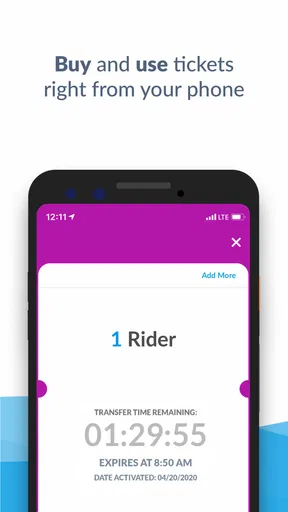
You can purchase NYC Ferry tickets through the official NYC Ferry app, at ticket machines near many landings, or through other approved sales options. A standard single-ride ticket generally allows one trip, while some fares and passes may have specific conditions. Buy your ticket before boarding, keep it available for inspection, and follow the instructions shown in the app or at the landing.
Does the NYC Ferry app show real-time schedules and service updates?
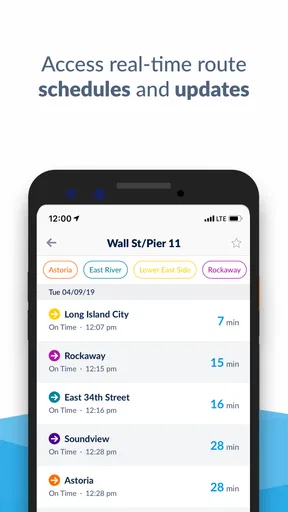
The NYC Ferry app is designed to help passengers review routes, departure times, landing locations, fares, and service information. It can be especially helpful when planning a connection or checking whether a ferry is approaching. However, displayed information may change quickly because of weather, vessel availability, crowding, or operational issues, so passengers should also watch announcements at the landing.
Can I bring bicycles, luggage, or pets on NYC Ferry?
NYC Ferry generally accommodates everyday personal belongings and bicycles, but space can be limited during busy periods. Bicycle policies, boarding priority, and any applicable fees or restrictions may depend on the route and the type of bicycle. Pets are usually subject to specific rules, and service animals receive separate protections. Review the latest official passenger guidelines before arriving with large items or animals.
Is NYC Ferry accessible for passengers with disabilities?
NYC Ferry aims to provide accessible transportation, and many vessels and landings include features intended to support passengers with mobility needs. Accessibility can vary by location, tide, weather, and temporary conditions at individual landings. If you require assistance, check the latest accessibility information in the app or on the official website and contact NYC Ferry before traveling to confirm the most suitable boarding arrangements.


